
About Cut List Maker
Built by a woodworker, for woodworkers.
Cut List Maker is a woodworking cut list optimizer designed to help woodworkers, makers, contractors, and DIY builders plan plywood and sheet-goods cuts with less waste. It combines practical workshop experience with straightforward software that helps turn a list of parts into an organized cutting layout.
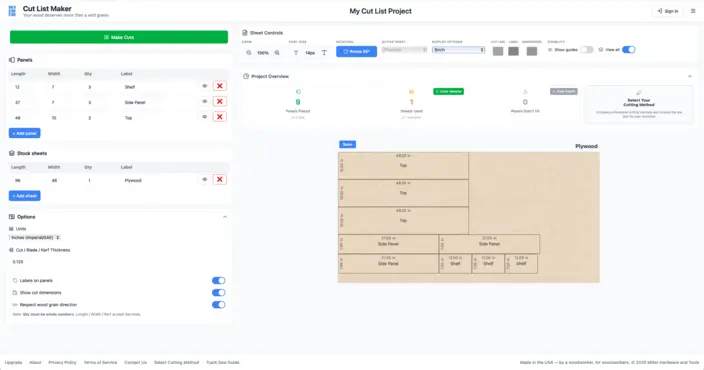
The Cut List Maker interface shows parts arranged on sheet material with dimensions, panel numbers, and waste areas.
Why Cut List Maker Was Built
Cut List Maker started with a common workshop problem: figuring out how to cut all the parts for a project without wasting expensive material.
Planning a plywood layout by hand can take time, especially when a project includes multiple sheets, repeated parts, grain direction, blade kerf, and different cutting methods. Cut List Maker was created to make that planning process faster, clearer, and easier to use in a real shop.
The goal is not to replace a woodworker's judgment. It is to provide a practical plan that helps you understand what material you need and how your parts can fit before making the first cut.
Meet the Maker
Cut List Maker was created by Philip Miller, a woodworker, maker, and technology professional behind Miller Made Workshop and Miller Hardware and Tools.
Philip combines hands-on workshop experience with a background in technology to build practical tools for woodworkers. Cut List Maker is developed around the challenges that come up in real projects, including sheet layout, material cost, kerf, grain direction, cutting workflow, and making the most of the tools already in the shop.
The application continues to improve through real workshop use, customer feedback, and ongoing development.
What Cut List Maker Helps You Do
- Arrange plywood and sheet-goods parts
- Configure blade kerf
- Respect grain direction
- Work in imperial or metric units
- Plan across multiple sheets
- Name and organize project parts
- Compare cutting layouts
- Select an appropriate cutting workflow (cutting methods)
- Import supported project data (3D model import)
- Export supported cutting layouts
- Estimate material usage and waste
- Save projects when the account tier allows it
How Cut List Maker Works
- Add Your Parts. Enter the length, width, quantity, and name of each part you need to cut.
- Configure Your Material. Add the dimensions and quantity of your plywood, sheet goods, lumber, or available offcuts.
- Choose Your Settings. Set your measurement units, blade kerf, grain direction, and other project options.
- Generate the Layout. Let the optimizer arrange the parts across the available material.
- Review Your Cutting Plan. Review the layout, cutting information, material use, and available export options before heading to the shop.
Built for Real Workshop Projects
Cut List Maker evaluates possible arrangements for the parts and materials entered into a project. The optimizer considers dimensions, quantities, blade kerf, available sheets, rotation settings, and other selected options when building a layout.
Because woodworking projects and cutting setups vary, the generated layout should always be reviewed before cutting. Confirm your measurements, account for your actual blade and equipment, and follow the safety instructions provided by the tool manufacturer.
Cut List Maker runs in a web browser, making it available from a computer, tablet, or supported mobile device without installing specialized desktop software.
More from Miller Hardware and Tools


About Miller Hardware and Tools
Miller Hardware and Tools creates practical physical and digital tools for woodworkers, makers, and craftspeople. Each product is developed around real workshop problems with an emphasis on usefulness, accuracy, and straightforward operation.
Plan Your Next Project
Enter your parts, add your material, and create a cutting layout for your next woodworking project.