
Choose the Right Plywood Cutting Method
The way you cut plywood shapes your layout, your cut sequence, and the tools you need on the bench. CutListMaker supports three cutting methods: a track saw and guide rail, a table saw, and a Cut Organized production layout. This page compares the three so you can choose the method that matches your tools and your shop.
Each method generates an optimized sheet layout and cut sequence tailored to that workflow. Pick the one you will actually use, enter your parts, and generate the plan.
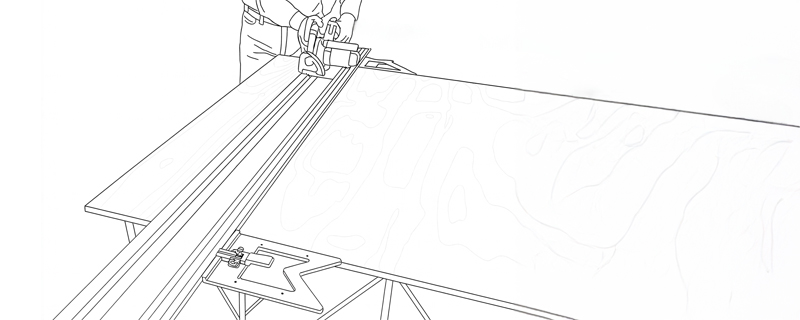
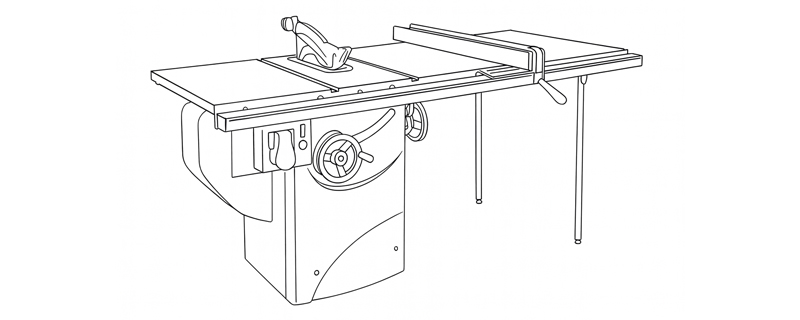
Compare Cutting Methods
| Attribute | Track Saw | Table Saw | Cut Organized |
|---|---|---|---|
| Best suited for | Breaking down full sheets with clean, accurate cuts | Repeatable rips, crosscuts, and batch work | An optimized layout when the tool is chosen at the bench |
| Typical workspace | Small shop or on site; sheet stays put | Fixed shop with infeed and outfeed clearance | Flexible; not tied to a fixed machine |
| Full-sheet handling | Sheet stays stationary; saw moves on the rail | Sheet is pushed through the blade; needs support | Layout only; handling follows your chosen tool |
| Repeat cuts | Parallel guides set a repeatable rail offset | Fence and stops set repeatable widths and lengths | Cut sequence is ordered; repeats depend on your tool |
| Portability | High; saw and rail travel to the work | Low; the saw stays in the shop | High; the layout goes wherever your tool does |
| Primary reference | Guide rail with splinter guard | Rip fence and crosscut sled | The generated cut sequence and layout map |
| Tool flexibility | Limited to a track saw and rail | Limited to a table saw setup | High; works with track saw, table saw, or other tools |
| Dedicated CutListMaker workflow | Yes; layout built around guide rail breakdown | Yes; layout built around fence and sled work | Yes; layout built as a production plan, tool-agnostic |
For a deeper look at the two saw-based workflows, see our track saw vs. table saw comparison.
Track Saw Cutting Workflow
A track saw uses a guide rail with anti-slip pads and an integral splinter guard to deliver clean, accurate cuts on full plywood sheets. The saw plunges into the material and moves along the rail, so the sheet stays stationary on a cutting table or foam board. In CutListMaker, the Track Saw method generates a cut sequence built around this guide rail breakdown.
Advantages
- The sheet stays put, so you do not need to lift and feed a full 4-by-8 panel.
- The guide rail keeps the blade on a fixed path for straight, repeatable cuts.
- A trimmed splinter guard helps reduce tear-out on the cut edge.
- Most track saws have effective dust collection when paired with a vacuum.
Considerations
- Requires a track saw and guide rail, which cost more than a basic circular saw.
- Long rails need storage space, and large sheets may need clamps or anti-slip pads.
- Repeatable widths rely on parallel guides rather than a fixed fence.
For a detailed setup and cutting walkthrough, see the track saw guide.
Table Saw Cutting Workflow
A table saw is the shop workhorse for repeatable cuts. The rip fence sets the width, and a crosscut sled handles square panels. With a tuned setup and a proper blade, a table saw produces consistent results for batch work. In CutListMaker, the Table Saw method generates a layout and cut sequence built around fence and sled work.
Advantages
- The fence and stops make repeatable widths and lengths fast.
- A crosscut sled produces square panels with consistent results.
- Works well for batch work after a sheet is broken down to manageable sizes.
Considerations
- Full sheets need significant infeed and outfeed clearance on both sides of the blade.
- A full 4-by-8 sheet is heavy and hard to manage alone through the blade.
- Kickback risk is higher; a riving knife, featherboards, and push sticks are important for safety.
Many woodworkers break down full sheets with a track saw first, then bring smaller panels to the table saw for final sizing. For a side-by-side look, see the track saw vs. table saw comparison.
Cut Organized Workflow
Cut Organized, labeled Production Layout in the app, arranges your parts into a clear, ordered cutting plan without tying the layout to one specific saw. You get an optimized sheet layout and a cut sequence, and you choose the tool at the bench. It is the most flexible CutListMaker method when your tool choice depends on the job or the shop you are in.
Advantages
- Works with a track saw, a table saw, or another tool you already have.
- Gives you a production layout and cut order without forcing a single machine workflow.
- Useful when you cut in different shops or on different jobsites.
Considerations
- It provides layout order rather than tool-specific steps, so you still decide handling and setup.
- Repeat cut speed depends on the tool you choose, not on a built-in fence or rail assumption.
If you later settle on a track saw or table saw workflow, switch the method and the layout regenerates to match.
Can I Use a Circular Saw and Straightedge?
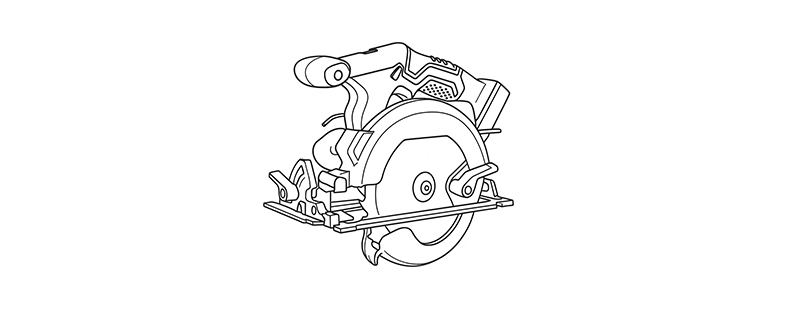
A circular saw paired with a clamped straightedge is a common, low-cost way to break down plywood. You clamp a straight board or aluminum guide to the sheet, offset by the distance from the saw blade to the edge of the shoe, and cut along the guide. The image below shows the approach.
Important. A plain circular saw is not one of the selectable CutListMaker cutting methods. CutListMaker offers Track Saw, Table Saw, and Cut Organized layouts. The Track Saw method matches the guide rail workflow that a circular saw with a straightedge follows in principle, but the circular saw itself is not a separate option in the app.
This section is educational only. It is separate from the application features above. If you cut with a circular saw and straightedge today, the Track Saw method in CutListMaker is the closest match for your workflow, and a track saw with a guide rail is the natural upgrade path. See the track saw guide for details.
Accuracy with a circular saw depends on how securely the straightedge is clamped and how carefully you keep the shoe against the guide. A good plywood blade and a shallow scoring pass on veneered sheets help reduce tear-out.
How to Choose a Cutting Method
No single method is universally best. The right choice depends on the tools you own, your workshop space, and the type of projects you build.
- Tools you own. If you have a track saw and rail, choose Track Saw. If you have a table saw with good infeed and outfeed, choose Table Saw. If you will decide the tool at the bench, choose Cut Organized.
- Space. Track Saw and Cut Organized work in small shops or on site. Table Saw requires significant infeed and outfeed clearance.
- Project type. For breaking down full sheets, Track Saw excels. For repeatable narrow rips and batch work, Table Saw is faster. For a flexible production layout, Cut Organized fits.
- Portability. If you work on job sites, Track Saw or Cut Organized travel with you. A table saw stays in the shop.
- Flexibility. Cut Organized gives you a layout without forcing one tool, so it adapts when your tool choice changes.
Many woodworkers use two methods together: a track saw for initial sheet breakdown and a table saw for final sizing. If you also plan projects from 3D models, see our 3D model import page.
How Cutting Methods Affect Your Layout
The cutting method you select changes how CutListMaker arranges your parts and orders your cuts. The parts list stays the same, but the sheet layout and cut sequence adapt to the workflow of the chosen method.
- Track Saw. The layout assumes breakdown on a guide rail, so the cut sequence follows rail-based cuts with the sheet staying put.
- Table Saw. The layout assumes fence and sled work, so the cut sequence follows repeatable rips and crosscuts suited to a fixed machine.
- Cut Organized. The layout is a production plan that is not tied to one saw, so the cut order stays useful across different tools.
You can switch methods at any time after adding your parts. The layout and cut sequence regenerate to match the selected method, while your part dimensions, kerf, and grain direction settings carry over.
Across all methods, CutListMaker accounts for blade kerf in the spacing between parts and respects the grain direction you set for each part. Start a cut list to see the layout for your parts.
Frequently Asked Questions
What is the best way to cut a full sheet of plywood?
A track saw is a strong choice for breaking down full sheets because the sheet stays stationary and the saw moves along a guide rail. A table saw can also work if you have enough infeed and outfeed space. For CutListMaker layouts, choose the Track Saw method to get a cut sequence built around guide rail breakdown.
Is a track saw better than a table saw for plywood?
A track saw is better for breaking down full sheets where portability and limited space matter. A table saw is better for repeatable narrow rips, dados, and batch work when you have enough shop space. Many woodworkers use both: a track saw for initial breakdown and a table saw for final sizing. See our track saw vs. table saw comparison.
Can I use CutListMaker with a circular saw?
A plain circular saw is not one of the selectable CutListMaker cutting methods. CutListMaker offers Track Saw, Table Saw, and Cut Organized layouts. The Track Saw method matches the guide rail workflow a circular saw can follow with a straightedge, but the circular saw itself is not a separate option in the app.
What is the Cut Organized method?
Cut Organized, labeled Production Layout in the app, arranges your parts into a clear, ordered cutting plan without tying the layout to one specific saw. It works when you want an optimized sheet layout and cut sequence but will decide the tool on the bench.
Does changing the cutting method change the layout?
Yes. Each cutting method produces a sheet layout and cutting sequence tailored to that tool's workflow. Track Saw layouts assume breakdown on a guide rail, Table Saw layouts assume fence and sled work, and Cut Organized produces a production layout that is not tied to one saw.
Can I change the cutting method after adding my parts?
Yes. You can add your parts first and switch between Track Saw, Table Saw, and Cut Organized at any time. The layout and cut sequence regenerate to match the selected method.
Does CutListMaker account for blade kerf?
Yes. CutListMaker accounts for blade kerf in the layout so parts keep their finished dimensions after each cut. Kerf is included in the spacing between parts on the sheet.
Does CutListMaker account for plywood grain direction?
Yes. CutListMaker respects the grain direction you set for each part so veneer grain runs the intended way on the finished panel. The optimizer keeps long-grain and cross-grain parts oriented correctly on the sheet.
Ready to Lay Out Your Cuts?
Pick a cutting method, enter your parts, and generate an optimized plywood cutting plan with CutListMaker.
Cut List Optimizer · Track Saw Guide · Track Saw vs. Table Saw · Import 3D Model · Compare Plans